
The Field Service App
Trades Businesses Stick With.
ServiceM8 combines quoting, dispatch, invoicing, checklists and client communication in one iOS app built specifically for the field. North Labs has run a previous business on it and sets it up, integrates and extends it for trades clients across the UK.
Built for the Field. Designed Around the Job.
ServiceM8 is an iOS-based field service management platform built specifically for trades and service businesses: electricians, plumbers, HVAC engineers, cleaning companies, pest control, refrigeration engineers and any business that dispatches staff to client premises. It replaces the combination of WhatsApp group chats, paper job cards, spreadsheets and chasing invoices that most growing trades businesses are running on when they outgrow their original process.
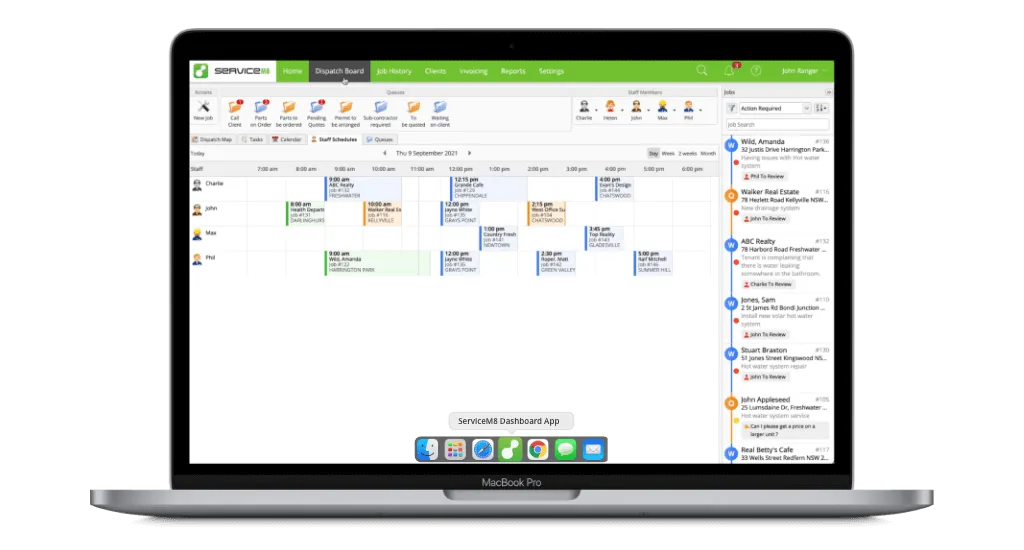
For field-based businesses
ServiceM8 is designed for businesses where the work happens off-site: the app travels with your field staff and keeps the office in sync in real time.
One platform, the full job lifecycle
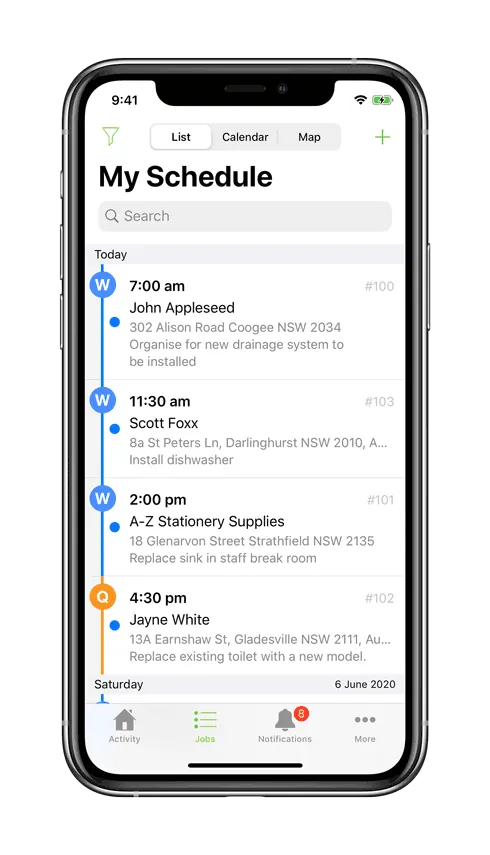
From first enquiry to paid invoice: quoting, job creation, dispatch, on-site checklists, invoicing and client communication all live in the same place.
iOS app plus web admin
Field staff use the iOS app on their phones. Office and admin staff use the full web dashboard in any browser. Both update in real time.
What ServiceM8 Actually Does
Every job has a home. Nothing gets lost.
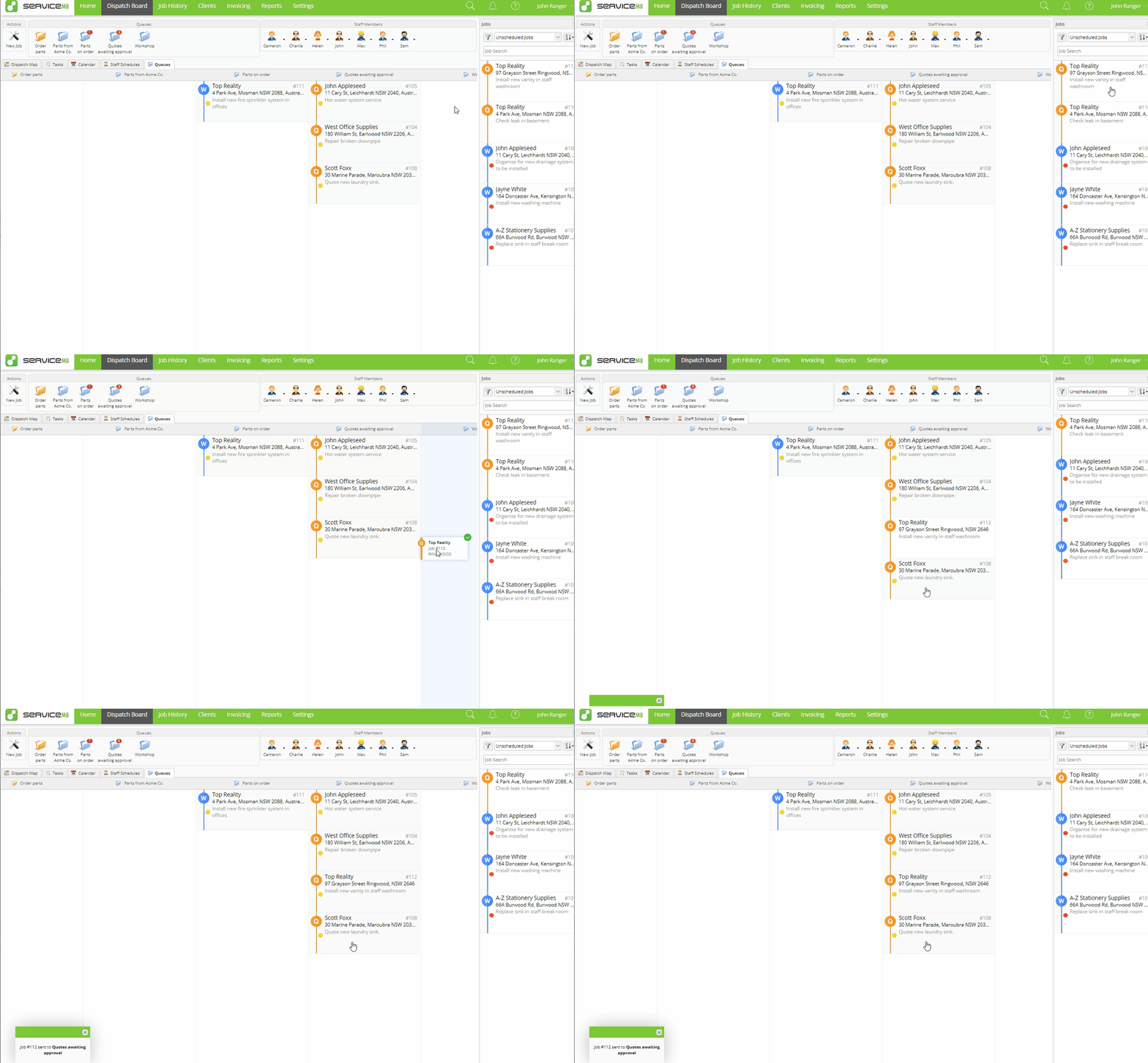
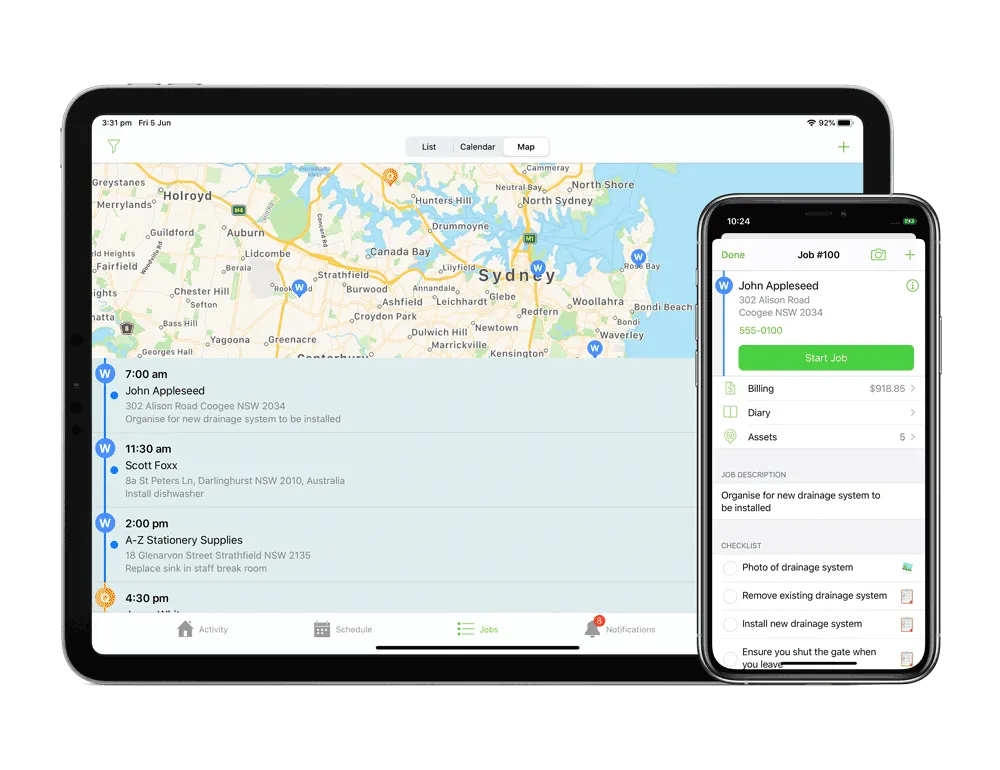
ServiceM8's queue-based workflow is one of its best-designed features and one that is not immediately obvious from the outside. Rather than a flat list of jobs, work moves through dedicated queues: the Work Queue for active jobs, the Quote Queue for outstanding quotes, the Invoice Queue for work awaiting payment, and the Recurring Queue for scheduled repeat visits. Every job sits in exactly one queue at any time, giving you and your team a real-time view of where everything stands without anyone having to manually check in or chase status.
- Work Queue: active and scheduled jobs assigned to field staff
- Quote Queue: quotes sent and awaiting client approval
- Invoice Queue: completed jobs ready to invoice and collect
- Recurring Queue: automated scheduling for repeat service visits
Confirmations, reminders and on-the-way texts. All automatic.
ServiceM8 handles the client communication that most small businesses forget, get around to too late, or do manually one message at a time. Booking confirmations go out the moment a job is created. Reminders land with the client the day before. When a technician heads to a job, an "on my way" SMS goes automatically. After completion, a follow-up message can prompt the client for feedback. All of this happens without anyone in the office lifting a finger, and it reads as professional and attentive even when the business is flat out.
- Automated booking confirmation SMS on job creation
- Day-before reminder with job details and arrival window
- "On my way" SMS triggered when technician starts travel
- Post-job follow-up for feedback and review capture
Field team in ServiceM8. Bookkeeper in Xero. No manual entry.
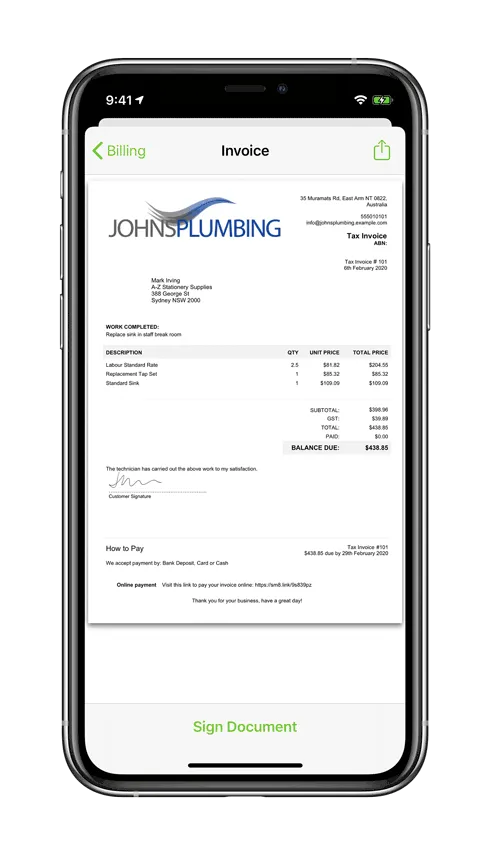
ServiceM8's Xero integration is one of the most mature in the field service management space, and it is genuinely two-way. Clients sync between both platforms. Inventory items and service line items stay consistent. When a job is completed and invoiced in ServiceM8, it pushes to Xero automatically. Payments recorded in Xero update back to ServiceM8. In practice, your field staff never need to touch the accounting system, and your bookkeeper never needs to re-enter data from job cards. QuickBooks Online is also supported with equivalent functionality.
- Two-way client and contact sync between platforms
- Service items and inventory kept consistent automatically
- Completed invoices push to Xero without manual export
- Payment status updates back to ServiceM8 from Xero
Also built into ServiceM8
Job card templates
Preset job cards for your most common job types mean new jobs are created consistently, with the right description, line items and checklist already attached. Saves setup time on every job and keeps your records clean.
Smart checklists
Customisable checklists attached to job types ensure work is completed consistently and to standard. Field staff work through the checklist on-site; the completed record stays attached to the job permanently. Useful for compliance, quality control, and post-job disputes.
Message templates
Preset message templates for common communication scenarios keep your client-facing copy consistent and professional, whether a message is sent manually or triggered automatically. Templates can include job details, staff names, and booking times as dynamic fields.
Review and feedback flow
ServiceM8 includes a post-job feedback flow for capturing star ratings from clients via SMS after job completion. For routing positive responses directly to a Google Business Profile review page, North Labs typically sets up a short automated step alongside the native flow, ensuring every five-star experience becomes a public review.
Genuinely affordable. Priced to scale with the business.
ServiceM8 is priced by job volume rather than a flat monthly licence, which means a growing business pays proportionally to how much work it is doing. There is a free tier for very small operations with a limited number of active jobs, and paid plans that step up as volume increases. For most trades businesses of any real size, the monthly cost is modest relative to what the platform replaces in admin time and missed follow-ups alone.
Pricing is set in Australian dollars and billed at the prevailing exchange rate, so the GBP equivalent will fluctuate slightly. For current tier names and prices, see servicem8.com/uk/pricing.
The short version: this is one of the most cost-effective field service management platforms available, which is a significant part of why North Labs recommends it.
Yes, it's iPhone only. Here's why that's a good thing.
A controlled environment in the field is worth a lot.
ServiceM8 is iOS-only for field staff. The admin web app runs in any browser, so your office team uses whatever they have. For field workers, iOS-only sounds like a constraint until you think about what it actually delivers: a consistent, well-maintained operating system with no fragmentation across device manufacturers, far fewer support headaches with updates, and no dependency on whether a specific Android handset happens to behave the same way as another one. Refurbished iPhones are genuinely affordable now, making a dedicated work phone realistic for most businesses, and a dedicated work phone is better for your staff as well as your business.
- iOS updates uniformly: one OS, predictable behaviour across every device
- Refurbished iPhones make dedicated work phones affordable at scale
- Dedicated work phones keep work off personal devices, staff prefer it
- No install permission issues or Android fragmentation to troubleshoot
We've Used It. Not Just Set It Up.
Configuration from someone who's run the system, not just read the docs.
North Labs has first-hand operational experience running ServiceM8 in a previous business, handling real jobs, real clients and real integration with Xero day to day. That is a different starting point from an agency that has read the knowledge base and watched the onboarding videos. It means faster setup, fewer configuration mistakes that only reveal themselves under real workload, and practical advice on the settings, workflows and workarounds that matter in practice rather than in theory.
- Operational experience across quoting, job management, dispatch and invoicing
- Xero integration configured and used in practice, not just in documentation
- Familiarity with the real limitations of the platform and how to work around them
- Setup that reflects actual day-to-day use, not a generic onboarding checklist
What ServiceM8 Doesn't Cover, and How We Fill the Gaps
ServiceM8 is excellent at what it does. Here is an honest account of where it reaches its limits, and what North Labs builds around those limits for clients who need the full picture.
No marketing or CRM layer
ServiceM8 is built for job execution, not for nurturing leads before they become jobs or re-engaging customers after the work is done. There is no campaign management, no database reactivation, no automated review-gathering beyond the basic post-job flow. North Labs Flow covers this side: CRM, follow-up sequences, review campaigns and reactivation, connected to ServiceM8 so the full loop runs automatically from first enquiry to five-star review.
Learn about North Labs Flow →Limited reporting out of the box
ServiceM8's built-in reporting covers basic job and revenue summaries. Growing businesses typically need more: revenue broken down by job type or technician, quote conversion rates over time, combined dashboards pulling from ServiceM8 and Xero side by side. North Labs builds these as custom dashboards via the ServiceM8 API, tailored to the metrics your management team actually needs to run the business.
Build, Custom Software →No deep cross-tool automation
ServiceM8's built-in automation is internal to the platform. For more complex workflows connecting ServiceM8 to other systems, North Labs uses the ServiceM8 API to build genuinely custom automated pipelines: lead and quote data flowing into ServiceM8 from your CRM, job completion data flowing back to trigger review requests, reactivation campaigns or accounting reconciliation. This is the deeper automation work beyond what the product handles natively.
Automate, Workflow Automation →Using a different FSM tool?
ServiceM8 is where North Labs' deepest hands-on expertise sits, but it is not an exclusive requirement. We can integrate with any field service management platform that exposes an API. If your business is already running on a different FSM tool and you need it connected to your marketing, CRM, reporting or accounting stack, a discovery call is the right place to start.
Questions We Get Asked
ServiceM8 works well for sole traders through to medium-sized businesses with multiple field staff and an office team. The free tier lets you try it with a limited number of jobs per month, and paid plans scale with job volume rather than charging a flat rate regardless of how busy you are. It is particularly well-suited to businesses that dispatch field workers to client premises: electricians, plumbers, HVAC engineers, cleaners, pest control and similar trades. If you run a mostly remote or consulting business, the job-card and dispatch model may be more structure than you need.
ServiceM8 handles the job execution side of a business brilliantly: quoting, dispatch, invoicing, checklists, client communication. What it doesn't cover is the marketing and lead nurturing layer: the CRM that captures enquiries before they become jobs, the follow-up sequences, the review-gathering campaigns, the database reactivation. North Labs connects ServiceM8 to North Labs Flow for that side of the business, so the full loop is covered from first enquiry to five-star review. Beyond that, we build custom reporting dashboards on top of ServiceM8 data, and automate more complex cross-tool workflows via the ServiceM8 API.
Yes. ServiceM8 has a well-documented API and supports direct webhook connections. We can connect it to virtually any platform that exposes an API: accounting software, CRM systems, custom dashboards, third-party scheduling platforms and more. North Labs Flow is where our deepest integration work sits for the marketing and CRM side, but the underlying API capability is broad. If you have an existing tech stack you want to connect ServiceM8 to, a discovery call is the right place to scope that.
ServiceM8 is iOS-only for field staff. The admin web app works in any browser on any device, so your office team can use whatever they are on. For field workers, the iOS requirement is genuine, but it is less of a practical obstacle than it sounds. Refurbished iPhones are very affordable, and having a dedicated work phone rather than staff using personal devices is genuinely better for the business: consistent app behaviour, no install permission issues, and proper separation between work and personal life for your team. We cover this in more detail on the page, but it is one of those constraints that looks like a drawback until you think it through.
ServiceM8 has one of the most mature Xero integrations in the field service management space. Once connected, clients sync both ways: create a client in ServiceM8 and it appears in Xero, and vice versa. Inventory items and service items stay in sync. Completed invoices in ServiceM8 push through to Xero automatically, and payments recorded in Xero update back to ServiceM8. In practice, your field team works entirely in ServiceM8 and your bookkeeper sees everything in Xero without any manual data entry between the two. QuickBooks Online is also supported with similar functionality.
Yes. ServiceM8's built-in reporting covers the basics well, but growing businesses often need views it cannot produce natively: revenue by job type, technician performance over time, quote conversion rates, or combined dashboards pulling from ServiceM8 and Xero side by side. We build these as custom dashboards via the ServiceM8 API, tailored exactly to what your management team needs to see. This sits within the Custom Software work North Labs does more broadly.
Ready to get ServiceM8 working properly?
Whether you are new to ServiceM8 and want it set up correctly from the start, or already using it and need the Xero integration, custom reporting or marketing automation layer added, the conversation starts with a free discovery call.
Need the full marketing and CRM layer alongside ServiceM8? See North Labs Flow.